/linear — Linear workflow
Five commands covering the full development cycle, from planning through to merge — all without leaving Claude Code.
Typical workflow
/linear:next-steps # see what needs doing
/linear:plan-work # create a new issue (if needed)
/linear:start PG-X # branch, implement, PR, terminal review
# ... you review the diff in the terminal ...
# ... someone reviews on GitHub ...
/linear:fix PG-X # address GitHub review feedback (if any)
/linear:finish PG-X # squash merge, clean up, Done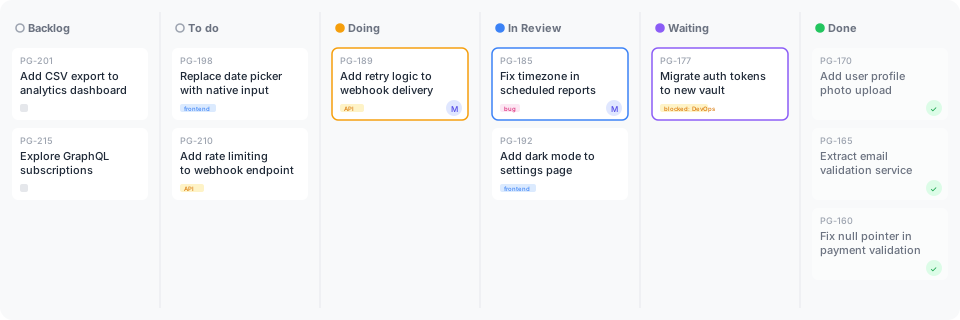 Issues flow from Backlog through Doing to Done, driven entirely by
 /linear commands. See the Kanban process for how the columns work.
Commands
/linear:next-steps
Review priorities and recommend next work. Shows current work, open PRs, recently completed issues, and backlog — then recommends 1–3 concrete next actions.
Priority ordering: build failure > PRs needing fix > in-progress work > PRs needing review > approved PRs to merge > backlog.
For each open PR, checks GitHub for CHANGES_REQUESTED reviews and unresolved comments. PRs needing fix are surfaced above new backlog work.
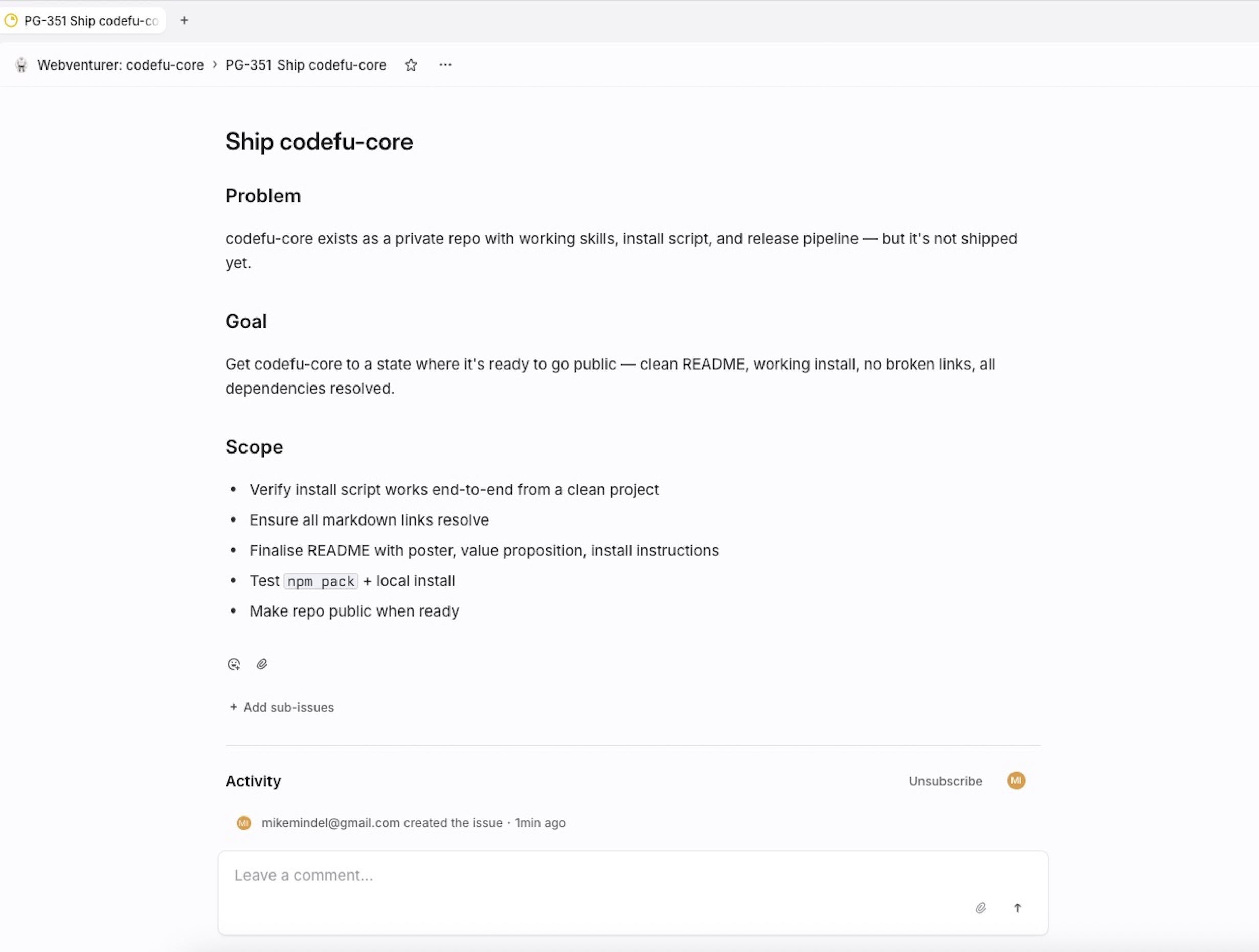 A well-structured issue created by
 /linear:plan-work — clear Problem, Goal, and Scope sections that give the agent everything it needs to start work.
/linear:plan-work
Plan work and create a Linear issue. Checks for duplicates, optionally refines the description with CRAFT, drafts title and description, and waits for your approval before creating.
In --research mode, explores the codebase and Linear first, then adds code examples (showing how similar patterns are already implemented) and acceptance criteria (observable outcomes, not implementation steps).
Usage:
/linear:plan-work "add dark mode toggle"— quick mode/linear:plan-work --research "add PostHog integration"— research mode/linear:plan-work --craft "add dark mode toggle"— auto-run CRAFT prompt refinement/linear:plan-work --research --craft "description"— research + CRAFT combined
/linear:start
Start work on a Linear issue. One headless flow: create or switch to the feature branch, move the issue to Doing, implement the changes, validate (build + tests), commit, push, open a PR, move to In Review, then show the full diff for terminal review.
Trusts the issue — the plan was agreed during /plan-work. No approval gate mid-flow.
Ends by asking: "Does this look right, or do you want changes?"
Usage:
/linear:start PG-205— explicit issue/linear:start— infers from branch
/linear:fix
Address GitHub PR review feedback. Reads review comments from GitHub (review body, line comments, past reviews), implements all requested changes in one pass, validates, pushes, and posts a summary comment on the PR.
Reviewer feedback takes priority over the original issue — plans evolve through review.
Usage:
/linear:fix PG-205— explicit issue/linear:fix— infers from branch
/linear:finish
Finish the issue. Runs build + tests (stops if they fail), squash merges the PR with a clean commit message, switches to main, deletes local and remote branches, and marks the issue Done in Linear.
The squash commit message reads as if the work was done right the first time — no mention of rejections, fix cycles, or iterations.
Usage:
/linear:finish PG-205— explicit issue/linear:finish— infers from branch
Setup
See the install guide for MCP server configuration. The commands also require the GitHub CLI for PR operations.
Reviewing PRs in VS Code
Install the GitHub Pull Requests extension to review PRs directly in your editor with in-line comments — no browser needed.