Issue statuses
How to configure Linear's issue statuses so your board columns match the Kanban process Stride expects.
Project status vs team statuses
These apply to different things:
Project status describes the lifecycle of a project as a whole — things like Backlog, Planned, In Progress, Completed, or Canceled. It's a stakeholder-facing summary and is updated manually.
Team statuses describe the workflow of an issue inside a specific team — things like Todo, In Progress, In Review, Done. These are team-specific and can also power automations.
A simple way to think about it:
- A project answers: "How is this larger body of work going?"
- An issue answers: "Where is this specific piece of work in the team workflow?"
Configuring issue statuses in Linear
The board column names come from your team's issue statuses.
- Go to Settings → Teams → [your team]
- Select Issue statuses & automations
- Edit the status names there
Renaming a status updates the corresponding board column label for that team. See the Kanban process for what each column means and how work flows between them.
Note: Issue statuses can only be configured through the Linear UI — the API doesn't support creating, renaming, or reordering status definitions.
Recommended statuses
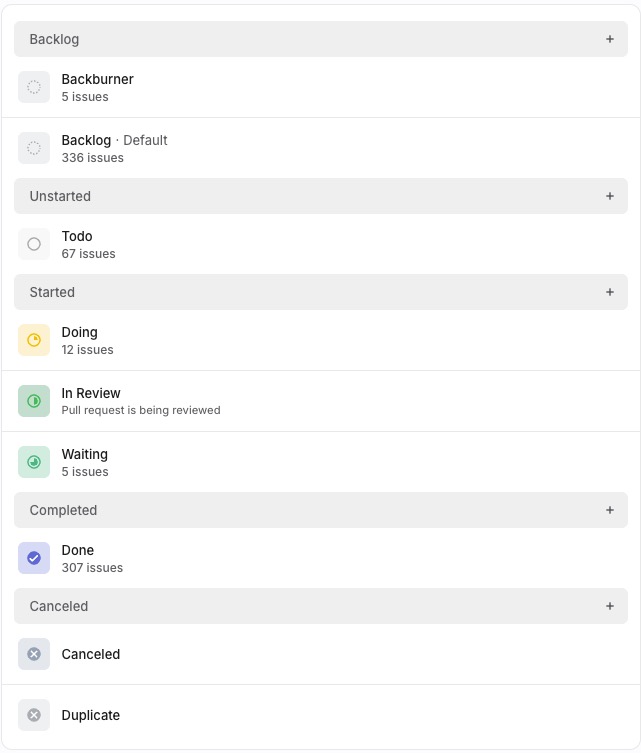
Why this organisation
Backburner sits under Backlog, not Canceled — backburner is not a graveyard. These are valid items that have been intentionally deferred, not rejected. Keeping them in the Backlog category means they stay visible during periodic reviews and can be promoted back to Todo when the time is right. If they were under Canceled, they'd disappear from the active board and never get revisited.
Waiting sits under Started, not Unstarted — a waiting item is in-flight work that's blocked on something external. It's not new work sitting in a queue — someone has already started it. Keeping it under Started means it counts against Work In Progress ("WIP") limits and stays visible as an active concern that needs unblocking.
Canceled vs Duplicate are separate statuses — both are terminal, but for different reasons. Canceled means "we decided not to do this." Duplicate means "this is covered by another issue." The distinction matters when reviewing closed work — it tells you whether a decision was made or whether work was consolidated.