Kanban process
Kanban is a workflow management method that visualises work as cards moving across columns on a board. Each column represents a stage — work flows left to right, and the board makes bottlenecks visible at a glance.
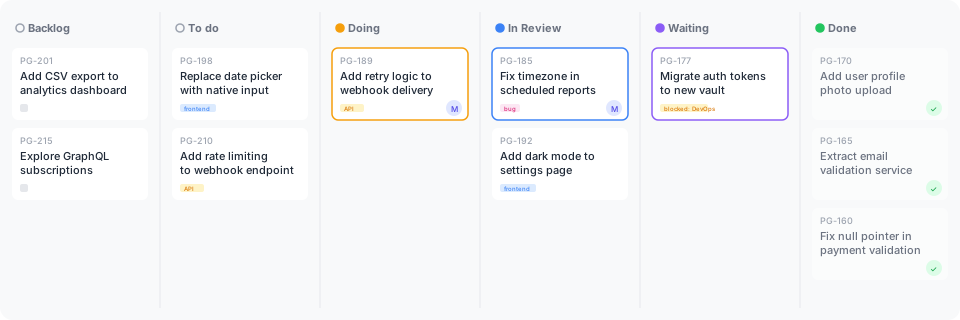
See Issue statuses for how to configure these columns in Linear.
Issue vs card
Kanban names the visual artefact a card — the rectangle on the board with title, status, and assignee, moving column by column. In stride, the card is the board rendering of a Linear issue — the content unit /linear:plan-work drafts and /linear:start <id> operates on. The two words name different aspects of the same artefact:
| Term | Means | Used when |
|---|---|---|
| issue | The content unit Linear's API and /linear:* commands operate on | Talking about planning, content, the thing with a description and status |
| card | The visual artefact on a kanban board | Talking about board rendering, kanban methodology, visual flow |
This page uses "card" throughout — board flow and column-by-column movement is the kanban frame. For the content side, the right word is "issue"; see the issue template.
The columns
| Category | Column | Purpose | Entry rule | Exit rule |
|---|---|---|---|---|
| Backlog | Backburner | Parked work — valid but not now | Team agrees to defer | Re-prioritised back to Backlog or Todo |
| Backlog | Backlog | New work not yet prioritised | Anyone can add work here | Prioritised and refined enough to start |
| Unstarted | Todo | Committed work, ready to pick up | Prioritised by the team | Someone pulls it into Doing |
| Started | Doing | Actively being worked on | Developer pulls from Todo | Implementation complete, ready for review |
| Started | In Review | Code complete, under review | PR opened or review requested | Reviewer approves or requests changes |
| Started | Waiting | Blocked on something external | Work cannot progress without input | Blocker resolved, moves back to Doing or forward |
| Completed | Done | Merged and deployed | Review approved, PR merged | — |
| Canceled | Canceled | Work we decided not to do | Team agrees to cancel | — |
| Canceled | Duplicate | Covered by another issue | Duplicate identified | — |
How work flows
| Backburner | Backlog | Todo | Doing | In Review | Waiting | Done | Canceled | Duplicate |
| Valid, but not now | New work, not yet prioritised | Prioritised, ready to pick up | Actively being worked on | Code complete, under review | Blocked externally | Merged and deployed | Decided not to do | Covered elsewhere |
The rules
- Pull, don't push — developers pull the next item from Todo when they have capacity. Nobody assigns work to a full queue.
- Limit work in progress — cap how many items can be in Doing and In Review at once. This prevents context switching and makes bottlenecks visible.
- Make blockers explicit — when work stalls, move it to Waiting with a note explaining what it's waiting on. Don't leave it in Doing looking like active work.
- Backburner is not a graveyard — items here are intentionally deferred, not forgotten. Review the backburner periodically and either promote items back or remove them.
Key principles
- Visualise the work — if it's not on the board, it doesn't exist. All work should be visible.
- Limit Work In Progress ("WIP") — the most counterintuitive and most important rule. Finishing work is more valuable than starting work.
- Manage flow — optimise for smooth, continuous movement across columns. A card stuck in one column for days is a signal.
- Make policies explicit — entry and exit rules for each column prevent ambiguity about when work should move.
WIP — work in progress
WIP (work in progress) is the number of items actively being worked on at any given time. In Kanban, you set a WIP limit — a maximum number of cards allowed in a column (typically Doing and In Review).
Why limit WIP?
- Focus — fewer items in flight means less context switching and faster completion of each one.
- Exposes bottlenecks — when a column hits its limit, upstream work stops. This makes the bottleneck impossible to ignore, forcing the team to fix it rather than pile up more work behind it.
- Pulls over pushes — a WIP limit means developers only pull new work when they have capacity, rather than having work pushed onto an already full plate.
The natural instinct is to start more work when something is blocked. WIP limits force the opposite: stop starting, start finishing.
Setting WIP limits
There's no universal number. A common starting point is number of team members + 1 for the Doing column. Adjust based on what you observe — if work flows smoothly, the limit is about right. If cards queue up before a column, that column's limit may be too low, or the next column's limit is hiding a bottleneck.
Common mistakes
- No WIP limits — without limits, everything is "in progress" and nothing finishes. The board becomes a to-do list with extra steps.
- Skipping Waiting — leaving blocked items in Doing hides the true state of work and inflates the active count.
- Backlog as a dumping ground — an ungroomed backlog grows endlessly. Regularly prune items that will never be done.
- Moving cards backwards — if review finds issues, the card goes back to Doing (not to Todo). Backwards movement through earlier stages signals a process problem.