/linear — Linear workflow
Ten commands covering the full development cycle, from setup through to merge — all without leaving Claude Code.
Typical workflow
# Utility
/linear:check # verify Linear access + board matches statuses JSON
/linear:setup # provision workflow states (non-destructive)
/linear:list-projects # list all projects across workspaces
/linear:update-vision # push VISION.md to Linear
/linear:next-steps # see what needs doing
# Workflow
/linear:plan-work # create a new issue (if needed)
/linear:start PG-X # branch, implement, PR, terminal review
# ... you review the diff in the terminal ...
# ... someone reviews on GitHub ...
/linear:fix PG-X # address GitHub review feedback (if any)
/linear:finish PG-X # merge, clean up, Done
# Ship-then-file (small changes)
/linear:quick "small fix" # implement, say "ship it", merge + file the card in Done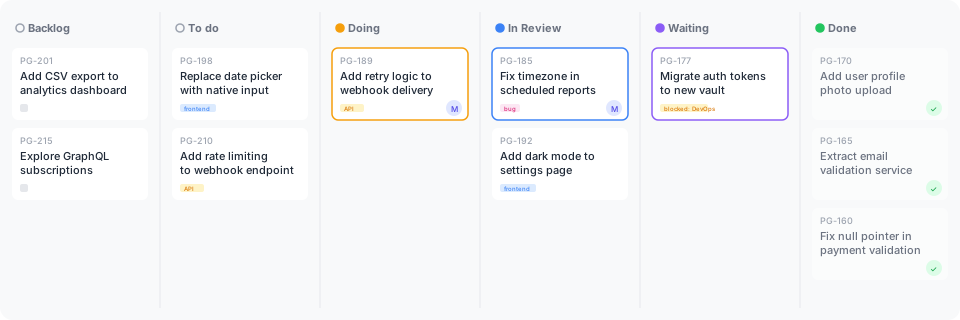 Issues flow from Backlog through Doing to Done, driven entirely by
 /linear commands. See the Kanban process for how the columns work.
Stories and epics
Most issues are stories — one deliverable that ships as one PR. When several stories serve a common purpose (bigger than a PR, smaller than the Vision), /linear:plan-work creates a parent epic and nests the stories under it as sub-issues. The lifecycle commands then surface the epic at the right moments — /linear:start shows it on pickup, /linear:finish prompts to close the epic when the last sub-issue ships, and /linear:next-steps lets you filter by epic. See Epics and stories for the full mechanism.
When do you need an issue?
Stride's gates aren't blanket every change → issue. Issues are the planning artefact for work that earns planning. Tiny changes (typo fixes, single-sentence rewrites, a tagline tweak) can go straight to main with /commit — no issue, no PR, no ceremony.
Three signals that mean an issue is needed:
| Signal | Why |
|---|---|
You'll go through /linear:start | The command needs an issue ID to read — there's nothing for it to load without one |
| The work is large enough that planning helps | An issue forces you to write down "Why this matters / What we'll do / What we won't do" — useful when you'd otherwise drift |
| The work needs to be visible on the board | Stakeholders or future-you reading the Kanban want to see it |
The common-sense test: could this be a single commit message, with no body needed beyond a sentence of "why"? If yes, no issue. If you'd find yourself wanting "Why this matters / What we'll do / What we won't do" sections, that's the signal you need an issue.
The line not to cross: wording tweaks preserve meaning (fine direct-to-main); refactors change structure (earn an issue); new sections add new content (earn an issue).
Examples
| Change | Route | Why |
|---|---|---|
| Fix a typo in README | No issue, direct commit | Obvious, no planning needed |
| Rewrite a sentence for clarity (preserving meaning) | No issue, direct commit | Wording fix, single commit message |
| Add a new section to a doc | Issue | New content earns planning |
| Reorder sections in a doc | Issue | Structural change |
| Add a new skill or command | Issue | Behaviour change, board-visible |
Fix a bug in install.mjs | Issue | Code change, deserves a PR record |
Once you've decided you don't need an issue, use a direct commit for an obvious documentation or configuration change. Use a branch and PR for code, behaviour, structure, or a diff that needs explanation.
Vision is a hard prerequisite
/linear:update-vision, /linear:next-steps, /linear:plan-work, /linear:start, and /linear:fix all require VISION.md at the repo root. If it's missing, the command stops and suggests running /vision first — without an anchor, ranking, planning, and implementation drift toward whatever feels reasonable, exactly the failure mode stride exists to prevent. (/linear:update-vision is the strictest case — it has nothing to push without VISION.md.)
The other Linear commands (/linear:check, /linear:list-projects, /linear:finish) don't gate on Vision — they operate on existing issues with no fresh design decisions to anchor.
Commands
/linear:check
Verify Linear access. Runs linear_cli.py whoami for each LINEAR_<WORKSPACE>_API_KEY in ~/.env to confirm it authenticates, then checks that every team's board carries the workflow states in linear_statuses.json and flags any drift. Because boards are per-team, it reports one row per team — a multi-team workspace gets each team checked, not just the first. If a team's board drifts, it points you at /linear:setup for that team (it never reconciles the board itself).
/linear:setup
Provision Linear workflow states. Card-aware. An empty team is set up to match linear_statuses.json — create the missing states, archive non-canonical ones, order them, and seed a sample card so the board renders — so /linear:start / /linear:finish transitions land instead of no-opping on a missing column. A team that already holds issues is never modified: setup only reports the target column order and what to fix in Linear's UI, because a live board is the human's to change. Asks which team to target when the workspace has more than one. (Reserved states like Duplicate can't be repositioned via the API, so they're left where Linear pins them.)
/linear:list-projects
List all projects across connected Linear workspaces. Runs linear_cli.py project list for each configured LINEAR_<WORKSPACE>_API_KEY and displays results grouped by workspace.
Usage: /linear:list-projects
/linear:update-vision
Mirror VISION.md to the Linear project. Reads VISION.md, resolves the Linear project from .stride.json, shows the diff against the current Linear content, and — once you confirm — pushes the file's contents into the project's content field via linear_cli.py update-project-content.
Requires VISION.md (see why). One-way only: repo → Linear, never the reverse. Idempotent — re-running with no VISION.md changes is a no-op.
The push stays explicit so you see the diff and choose the moment, rather than /vision silently overwriting the Linear page on every run.
Usage: /linear:update-vision
/linear:next-steps
Review priorities and recommend next work. Shows current work, open PRs, recently completed issues, and backlog — then recommends 1–3 concrete next actions.
Requires VISION.md (see why).
Priority ordering: build failure > PRs needing fix > in-progress work > PRs needing review > approved PRs to merge > backlog. Within each tier, ordering is refined by Vision alignment — items advancing the least-progressed Success criteria sit higher. Recommendations name the Vision outcome each item serves so you can see why the agent picked it.
For each open PR, checks GitHub for CHANGES_REQUESTED reviews and unresolved comments. PRs needing fix are surfaced above new backlog work.
/linear:plan-work
Plan work and create a Linear issue. Checks for VISION.md, then for duplicates, optionally refines the description with CRAFT, drafts title and description, and waits for your approval before creating.
Requires VISION.md (see why). Every draft's "Why this matters" section explicitly traces back to a Vision outcome, and the agent pushes back if the user's request can't be tied to one. When a broad description splits into multiple follow-ups, the follow-ups are ordered by Vision alignment — the one advancing the least-progressed Success criterion sits first.
In --research mode, explores the codebase and Linear first, then adds code examples (showing how similar patterns are already implemented) and acceptance criteria (observable outcomes, not implementation steps).
The --worktree flag is the place to opt into an isolated workspace — after the issue is created, the command sets up a git worktree at ../<repo-dirname>-<issue-id-lowercase>, opens VS Code there, and hands off to a new Claude Code session. /linear:start runs inline by default; if you want a worktree, decide at planning time, not start time.
Story is the default; epic when warranted. Most descriptions are story-sized — one deliverable that ships as one PR — so /linear:plan-work skips the sizing question and proceeds straight to drafting.
After CRAFT (if used), the agent runs size-sensing on the description and looks for epic-shape signals:
- multiple
and-joined outcomes that don't share a single purpose - references to phases or rollouts
- descriptions that resist a single stakeholder-readable PR title
- roadmap-shaped length and structure
If signals fire, a soft prompt offers three paths — break into an epic with sub-issues, narrow to one story, or proceed as one story. The user always has final say.
When you already know it's epic-sized, pass --epic to skip sensing and go straight to the parent-issue flow.
Cross-project quick add. Sometimes you're working in repo foo and notice a task that belongs in project bar — and you don't have bar cloned locally. Pass --project <name> to file the issue against bar without leaving foo. The Vision check is skipped (the current repo's Vision doesn't apply to another project's work) and the issue lands in bar's Backlog. When bar's owner picks it up via /linear:start from inside bar's repo, full Vision-anchored implementation kicks in there.
Usage:
/linear:plan-work "add dark mode toggle"— quick mode/linear:plan-work --research "add PostHog integration"— research mode/linear:plan-work --craft "add dark mode toggle"— auto-run CRAFT prompt refinement/linear:plan-work --research --craft "description"— research + CRAFT combined/linear:plan-work --worktree "description"— also set up an isolated worktree after creation/linear:plan-work --epic "Bulk blog processing across 200 articles"— skip size-sensing, draft as a parent-issue epic/linear:plan-work --project bar "task description"— file into a different Linear project, skip the Vision check
/linear:quick
Ship a small change, then file the card after. For work too small to plan up front — a copy tweak, a padding fix, a doc-link repair — the up-front card is the friction. /linear:quick inverts the order: it opens a PR for you to review (on GitHub, before anything merges), and when you say a ship phrase (ship / ship it / quick / jfdi / go) it merges with --merge and files the Linear card born directly in Done with the merged PR attached. The board shows a finished card pointing at the PR — no Backlog → Doing → In Review journey, because the work bypassed those states by design.
Two ways in: describe it (/linear:quick "..." — branch, implement, ship) or already did it (make the change first, then run /linear:quick to file the card matching your existing diff).
The merge fires only on an explicit ship phrase — the agent never decides on its own that a change is ready. If the change grows past a one-scroll diff or crosses files non-trivially, it stops and points you back to /linear:plan-work. Like /linear:finish, it first moves any commit that doesn't serve this change off the branch. The Vision trace runs before the merge and is surfaced like /linear:finish — a drift is shown for your decision (ship against the best-fit criterion, pick a better one, or add one to VISION.md first), not silently shortcut. After the merge you can file the card now or hold it to bundle several small changes into one Done card.
Good candidates for the fast loop. The fast-loop fits work where the shape is already obvious from the description and the diff fits comfortably in one terminal scroll. Examples:
- Design tweaks — typography, spacing, colour swap, padding adjustment, icon switch
- Copy and wording — typo fix, sentence rewrite, heading rename, button-label change
- Documentation polish — broken link, formatting consistency, sentence break, list normalisation
- Single-file refactors — extract a variable, rename a function within one file, inline a one-off helper
- Config tweaks — adjust a threshold, update a default, change a constant
- Dead code removal — orphaned imports, unused functions, dead branches the diff makes obvious
- Comment / docstring additions — when the what is obvious from the code but the why isn't
When not to reach for /linear:quick: the change crosses files in non-trivial ways, touches a public API or shared contract, requires migration, evolves the Vision, or carries any uncertainty about scope or risk. Those still earn the card-first discipline of /linear:plan-work.
Usage: /linear:quick "tighten the hero heading spacing"
/linear:start
Start work on a Linear issue. One headless flow: create or switch to the feature branch, move the issue to Doing, inspect the current repository, surface a concrete implementation checklist, work through it visibly, validate (build + tests), auto-squash similar commits, push, open a PR, move to In Review, then show the full diff for terminal review.
Requires VISION.md (see why). The command surfaces the outcome the issue serves (extracted from its "Why this matters" section) and carries it as context throughout implementation.
While iterating, you naturally produce journey-shaped commits — "first attempt", "wait that broke X", "ok now it's fixed", "format pass". Before merge, those should be rewritten to describe where you ended up, not how you got there.
The agent groups commits by purpose and squashes similar ones into single commits with rewritten messages. Conservative by default — when uncertain whether two commits belong together, they stay separate. The user gates via terminal review and can recover the original commits via reflog if a squash was wrong.
Treats the issue as the agreed specification — outcome, boundary, constraints, and proof — then derives an implementation checklist from the repository as it exists when work starts. The checklist names the affected files or responsibilities and the checks that prove the result; /linear:start shows it before editing and marks items complete as it works. It proceeds without an approval gate when the plan clearly satisfies the issue, and pauses only when the code exposes a missing decision, contradiction, or required scope expansion. The card is the contract; the checklist is the current route. Branches are created inline by default — no "worktree or inline?" prompt. To run on a worktree instead, opt in at planning time via /linear:plan-work --worktree.
Ends by asking: "Does this look right, or do you want changes?"
Usage:
/linear:start PG-205— explicit issue/linear:start— infers from branch
/linear:fix
Address GitHub PR review feedback. Reads review comments from GitHub (review body, line comments, past reviews), implements all requested changes in one pass, validates, pushes, and posts a summary comment on the PR.
Requires VISION.md (see why). The command surfaces the outcome the parent issue serves and carries it as context while applying review feedback.
Reviewer feedback takes priority over the original issue — plans evolve through review.
When to use it:
| Situation | Use |
|---|---|
| You're driving the iteration yourself, mid-session | Keep talking to Claude in the same session — faster, no PR-comment overhead |
| Someone else (or future-you) reviewed on GitHub | /linear:fix — built to read PR reviews and apply them in one pass |
| You want the reasoning visible on the PR record | PR comments + /linear:fix — leaves a durable trail |
/linear:fix is the tool for external review feedback. In-session chat is the tool for you steering. Don't add PR comments to yourself just to feed /linear:fix — that's ceremony for no gain.
Usage:
/linear:fix PG-205— explicit issue/linear:fix— infers from branch
/linear:finish
Finish the issue. Runs build + tests (stops if they fail), merges the PR with --merge so each atomic commit lands on main intact, switches to main, deletes local and remote branches, and marks the issue Done in Linear.
The merge commit carries only the default subject. The branch's own commits explain what was built and why, each reading as if the work was done right the first time — no mention of rejections, fix cycles, or iterations.
Before merging, it checks that every commit on the branch serves the card. A commit that serves something else moves to main or its own branch first, so the PR ships one deliverable.
Usage:
/linear:finish PG-205— explicit issue/linear:finish— infers from branch
Setup
See the install guide for connecting Linear via a per-workspace API key. The commands also require the GitHub CLI for PR operations.
Reviewing PRs in VS Code
Install the GitHub Pull Requests extension to review PRs directly in your editor with in-line comments — no browser needed.